Drupal Maintenance Services: The Complete Guide for 2026
 November 17, 2026
Most organisations understand, in principle, that their Drupal site needs to be kept up to date. What they underestimate is what that actually means. A Drupal maintenance programme is not a single task run quarterly. It is a layered set of responsibilities with different tasks running on different schedules, each addressing a different category of risk.
This guide covers what those tasks are, how often each one should run, and how to decide whether to manage it internally or hand it to a specialist.
1. What Does Drupal Maintenance Actually Cover?
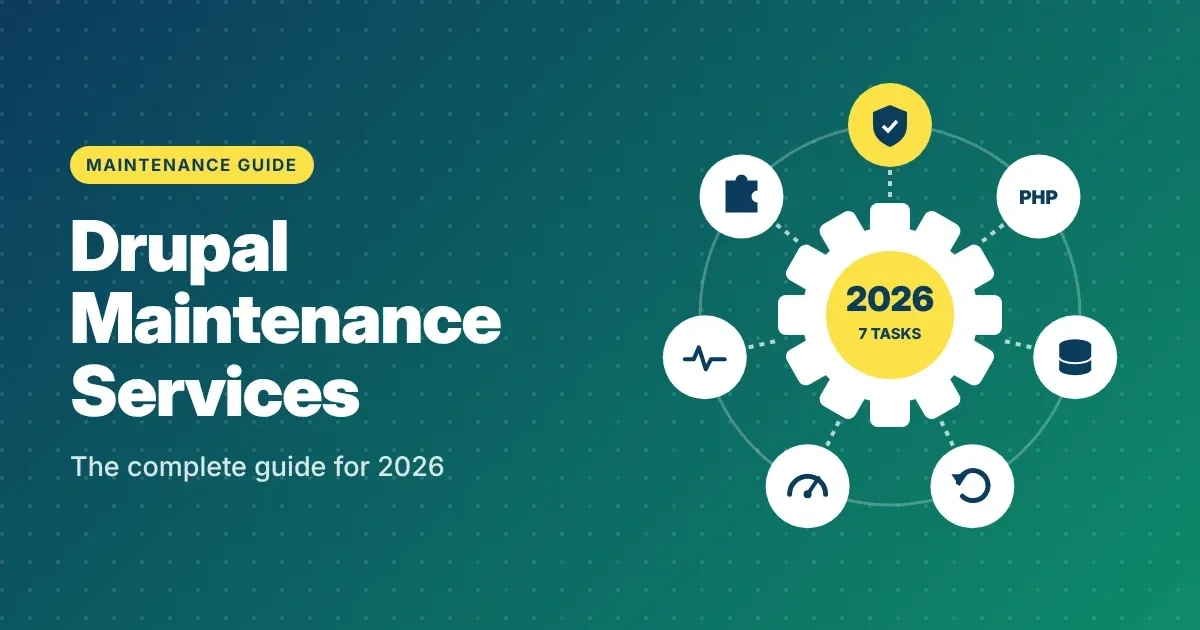
Drupal maintenance is not just running updates when a notification appears. A complete programme has seven distinct components. Most organisations cover one or two of these and assume the rest is handled. It is not.
Security updates for Drupal core and contributed modules. The Drupal Security Team publishes security advisories on a regular schedule, typically on Wednesdays. Each advisory is rated by severity: less critical, moderately critical, critical, and highly critical. Critical and highly critical advisories need to be acted on within 24 to 72 hours. Contributed modules — the third-party extensions your site depends on — publish their own independent updates and need to be tracked separately.
PHP version maintenance. Drupal 10 supports PHP 8.1, 8.2, and 8.3. Drupal 11 requires PHP 8.3 as a minimum. PHP itself has its own end-of-life dates: PHP 8.1 reached end of life in November 2024, and PHP 8.2 reaches end of life in December 2025. Running Drupal on an unsupported PHP version means security patches no longer reach the runtime layer underneath Drupal. Hosting environment updates are as important as Drupal-layer updates.
Database maintenance. Drupal stores content, configuration, session data, and application logs in a database. Without periodic housekeeping — purging watchdog logs, optimising table indexes, reviewing slow queries — database performance degrades gradually and unnoticed.
Backup verification. Most hosting environments create automated backups. Fewer organisations ever test that those backups can actually be restored. A backup that has never been successfully restored is an assumption, not a safety net. Restoration testing to a staging environment belongs in a maintenance cycle.
Performance monitoring. Slow pages do not always trigger error alerts. Time to First Byte, cache hit rates, and Core Web Vitals all degrade over time as content grows and traffic patterns shift. Monitoring these continuously catches performance regression before it reaches your visitors.
Uptime and error monitoring. Errors that only logged-out users encounter are invisible to logged-in administrators. Uptime checks, 5xx error rate tracking, and JavaScript error logging catch problems that real users experience before a support ticket arrives.
Module support status tracking. Contributed modules occasionally lose their maintainers and fall out of active support. When a module is no longer maintained, security vulnerabilities in it will not receive patches. A maintenance programme tracks the support status of every module on the site.
2. What Happens When Drupal Maintenance Is Skipped
The Drupal Security Team discloses vulnerabilities publicly when it publishes an advisory. Exploit code for critical vulnerabilities appears within hours of disclosure, not weeks. Sites running unpatched Drupal installations become targets through automated scanning, not targeted attacks — which means size and obscurity offer no protection.
Beyond security, skipped maintenance creates technical debt. Modules fall out of support. Custom code uses APIs that are deprecated in one version and removed in the next. Database tables grow without cleanup. Cache layers become inconsistent. The result is a site that becomes harder and more expensive to work on over time, until a forced major upgrade or a security incident triggers emergency action.
The financial cost is not theoretical. Emergency response work — security breach remediation, emergency patching, unplanned downtime recovery — typically costs three to five times what a planned maintenance programme would have cost over the same period. For organisations under GDPR, HIPAA, or similar regulatory frameworks, an unpatched vulnerability that leads to a data incident carries notification obligations and potential fines on top of the remediation cost.
Organisations that treat Drupal maintenance as reactive consistently spend more than those running a structured programme. The difference is not marginal.
3. How Often Each Maintenance Task Should Run
Different maintenance tasks run on different schedules. The table below reflects established practice for a production Drupal site on business-critical traffic.
| Task | Frequency | Notes |
|---|---|---|
| Monitor Drupal security advisories | Daily | Automated feed monitoring with human triage |
| Apply critical and highly critical security patches | Within 24–72 hours | Faster for remote code execution or authentication bypass vulnerabilities |
| Apply moderately critical and less critical patches | Monthly | Batch with module updates to reduce testing overhead |
| Drupal core minor version updates | Monthly | Test on staging first; never apply directly to production |
| Contributed module updates | Monthly | Test in staging; check changelogs for breaking changes |
| Review PHP version against Drupal support matrix | Quarterly | PHP 8.1 is end of life as of November 2024; PHP 8.2 reaches EOL December 2025 |
| Database housekeeping (log purge, index optimisation) | Monthly | Prevents gradual query performance degradation |
| Backup restoration test | Quarterly | Restore to staging, verify data integrity and site function |
| Core Web Vitals and performance baseline review | Monthly | TTFB, cache hit rate, Largest Contentful Paint against previous month |
| Uptime and 5xx error rate check | Continuous | Automated alerting with a defined escalation path |
| Infrastructure review (web server, SSL, OS patches) | Quarterly | SSL certificate expiry is a common and avoidable incident cause |
| Module support status audit | Quarterly | Flag unmaintained modules before they become a security liability |
Sites with higher traffic, complex integrations, or compliance obligations — healthcare, government, financial services — typically apply critical patches within hours and run security monitoring continuously. The right cadence for your site depends on its risk profile, not a standard schedule.
4. What Your Hosting Environment Needs to Support Maintenance
Drupal maintenance does not happen only at the application layer. Your hosting environment needs to support the maintenance cycle, or updates become harder to run safely.
Staging environment. Every production Drupal site should have a staging environment that mirrors production: same codebase, same database content (sanitised), same PHP version, same server configuration. Without this, updates are tested in production, which means incidents are production incidents.
SSH and Composer access. Drupal 10 and Drupal 11 use Composer for dependency management. Applying updates without SSH and Composer access on the server means manually uploading files, which is error-prone and does not respect the dependency tree. Shared hosting that restricts SSH access makes routine maintenance significantly riskier.
Automated backups with off-site storage. Backups stored only on the same server as the site are not backups in any meaningful sense. If the server fails or is compromised, both the site and the backup are lost. Backups need to be stored off-site and tested regularly against a restoration target.
PHP version. Drupal 10 runs on PHP 8.1, 8.2, or 8.3. PHP 8.1 reached end of life in November 2024. PHP 8.2 reaches end of life in December 2025. Drupal 11 requires PHP 8.3 as a minimum. If your hosting environment is running an end-of-life PHP version, the server itself is unpatched at the runtime layer, regardless of how diligently Drupal updates are applied.
Pantheon and Acquia are the two most commonly used managed Drupal hosts that include SSH, Composer, Drush, staging environments, and automated backups as standard. If your current hosting does not provide these, now is the time to evaluate a move before the next major update becomes an incident.
5. Internal Team vs Managed Maintenance: Which Fits Your Situation
The question of whether to handle Drupal maintenance with an internal team or a specialist partner comes down to four things: Drupal expertise, available capacity, risk tolerance, and cost structure.
When an internal team is the right fit: Your development team has active, production-level Drupal experience. Someone owns maintenance explicitly — it is not a shared informal responsibility that gets deprioritised when sprint work picks up. You have staging infrastructure, documented rollback procedures, and test coverage for the site's critical paths. Your module count is manageable and your customisation layer is well understood.
When a managed maintenance service makes more sense: Drupal is a platform your team built on, not a specialisation. Internal updates keep slipping because there is always more urgent work. There is no documented rollback procedure. You have experienced the pattern of updates being delayed by three to six months and discovering compatibility problems during a forced update rather than on a schedule. Your site has regulatory or uptime requirements where an incident has material consequences.
For most organisations running Drupal as infrastructure rather than as a product they actively develop, managed maintenance is not an overhead cost. It is risk transfer — the difference between owning the outcome and delegating the effort.
| Factor | Internal team | Managed service |
|---|---|---|
| Drupal expertise required | High | Provided |
| Consistent update cadence | Depends on team capacity | Contractually defined |
| Emergency response SLA | Informal | Formally agreed |
| Staging and test discipline | Variable | Included |
| Cost structure | Embedded in salary overhead | Transparent monthly fee |
| Accountability | Shared informally | Single point of contact |
6. What to Look for in a Drupal Maintenance Provider
Not every agency offering Drupal maintenance has the operational depth to deliver it reliably. These questions will tell you quickly whether a provider is running a real maintenance programme or a loosely defined retainer.
Ask for their security advisory SLA. A provider without a defined response time for critical advisories is not running a maintenance programme. The answer should be a specific window: 24 hours or 48 hours for critical advisories, with a faster window for advisories involving remote code execution or authentication bypass. Vague answers like “as soon as possible” are not an SLA.
Ask how they test updates before production. Any responsible provider applies updates to a staging environment first and runs a defined test process before promoting to production. If the answer is that updates go straight to production or that testing happens on a local copy that may be months out of date, the process is not adequate.
Ask what the rollback procedure looks like. Updates break things. The question is not whether a provider has had an update cause a problem; it is whether they can reverse it quickly when it happens. Ask for the rollback time and who makes the call to trigger it.
Ask what is included in their monthly report. A maintenance service without reporting is a black box. You should receive a monthly document that covers what was updated, what was tested, what monitoring detected, any anomalies, and any items that require a decision from your side. If a provider cannot describe a report format, they are probably not producing one.
Ask how they handle modules that go unmaintained. Contributed modules lose their maintainers. When this happens, security vulnerabilities in those modules stop receiving patches. A provider who actively tracks the support status of every module on your site and flags issues early is running a materially different service from one who only applies updates when they appear.
Common Questions — Answered Directly
How often should Drupal be updated? Security advisories from the Drupal Security Team are published on a regular schedule, typically on Wednesdays, and need to be acted on based on their severity rating. Critical and highly critical advisories need to be applied within 24 to 72 hours. Module updates and Drupal core minor version updates are typically batched monthly to reduce the testing overhead of applying each one individually.
What is the difference between Drupal maintenance and Drupal hosting? Hosting provides the server environment your site runs on. Maintenance covers the Drupal application itself: security updates, module patches, PHP version management, database housekeeping, backup testing, and performance monitoring. Many hosting providers do not apply Drupal-layer updates at all. Those two responsibilities need to be clearly owned by someone.
What is the difference between Drupal maintenance and Drupal support? Maintenance is proactive and scheduled: updates, monitoring, and housekeeping run on a defined cadence regardless of whether anything has broken. Support is reactive: investigating and resolving issues that arise. A complete programme includes both. Some agencies offer them separately; others bundle them under a care plan or retainer.
Does Drupal hosting include maintenance? Not usually. Most managed hosting providers — including Pantheon and Acquia — provide server infrastructure, automated backups, and sometimes PHP version management, but they do not apply Drupal core updates, contributed module updates, or custom code patches on your behalf. That is application-layer maintenance, and it needs to be handled separately.
What PHP version does my Drupal site need? Drupal 10 supports PHP 8.1, 8.2, and 8.3. PHP 8.1 reached end of life in November 2024, meaning it no longer receives security patches. PHP 8.2 reaches end of life in December 2025. If your site is running on PHP 8.1 or 8.2, your server runtime is unpatched regardless of how current your Drupal version is. Drupal 11, released in January 2025, requires PHP 8.3 as a minimum.
How much does managed Drupal maintenance cost? The range is wide depending on site complexity, module count, traffic volume, hosting environment, and SLA requirements. A straightforward production site with a standard module set and a monthly update cycle typically falls between $500 and $1,500 per month for a managed service. Sites with more complex integrations, higher traffic, or stricter response-time SLAs cost more. Emergency remediation for a site that has not been maintained routinely almost always costs more than a full year of a managed maintenance contract.
What should a Drupal maintenance report include? A monthly maintenance report should cover: which modules and core versions were updated, what was tested and on which environment, what monitoring detected during the month, current module support status, any items requiring a decision from your side, and the next scheduled maintenance tasks. If a provider cannot show you a sample report, ask why.
Drupal Maintenance Quick Reference Checklist
- ☐ Confirm who owns Drupal maintenance responsibility in your organisation — one person, not a shared informal assumption
- ☐ Check your current Drupal version at /admin/reports/status
- ☐ Check your PHP version — PHP 8.1 is end of life (November 2024); PHP 8.2 reaches EOL December 2025
- ☐ Subscribe to Drupal security advisories at drupal.org/security or sign up for email notifications
- ☐ Confirm a staging environment exists that mirrors production, including PHP version and database content
- ☐ Run a test restore from your most recent backup to confirm it restores successfully
- ☐ Run a module support status check — identify any contributed modules that are unmaintained or unsupported
- ☐ Review Core Web Vitals in Google Search Console and establish a baseline against which to track changes
- ☐ Confirm uptime monitoring is in place with an alert escalation path that reaches a human
- ☐ Set a recurring calendar block for monthly module and core update review
- ☐ Document your rollback procedure: who makes the decision, what the steps are, how long it takes
- ☐ If you are on Drupal 10, plan your Drupal 11 upgrade before December 9, 2026, when Drupal 10 reaches end of life
- ☐ If no internal Drupal capacity exists for consistent maintenance, evaluate a managed maintenance provider
CTA
Not sure what your site's current maintenance status looks like? We assess Drupal sites every week and can give you a clear picture of where things stand .
Get a free Drupal technical audit at drupalify.com/free-audit — no obligation, report delivered within five business days.
Get your free audit at drupalify.com/free-audit

Dixit Patel
Web Developer & BloggerI write about web development, programming tips, and Drupal Commerce solutions. Follow me for tech tutorials and updates.
Get a Free Drupal Audit →
Discover security vulnerabilities, performance bottlenecks, and code health issues on your site.
Get a Free Drupal Audit →



Struggling with
Let Us Audit Your Website for Free & Share Actionable Fixes